| name | last commit | updated |
|---|---|---|
| Sources/ | iOS: a time for schedule and deadline prompts | 1 month ago |
| Tests/ | Folded headings: a new heading goes after the subtree; arrow keys skip folds on iOS | 1 month ago |
| docs/ | Appcast for 0.4.0 | 1 month ago |
| ios/ | Version 0.4.1, build 7 | 1 month ago |
| l10n/ | Paste, drop and take photos into notes on iOS | 1 month ago |
| packaging/ | Release script writes the appcast; cask auto_updates | 1 month ago |
| scripts/ | Version 0.4.1, build 7 | 1 month ago |
| .gitignore | Fix iOS build warnings | 1 month ago |
| CONTRIBUTING.org | README for users, dev notes in CONTRIBUTING.org | 1 month ago |
| LICENSE | Initial commit | 1 month ago |
| Package.resolved | LaTeX fragment preview | 1 month ago |
| Package.swift | Merge main into ios-english-default | 1 month ago |
| README.org | remove readme title | 1 month ago |
| THIRD_PARTY.org | README and THIRD_PARTY in Org; app icon in README title | 1 month ago |
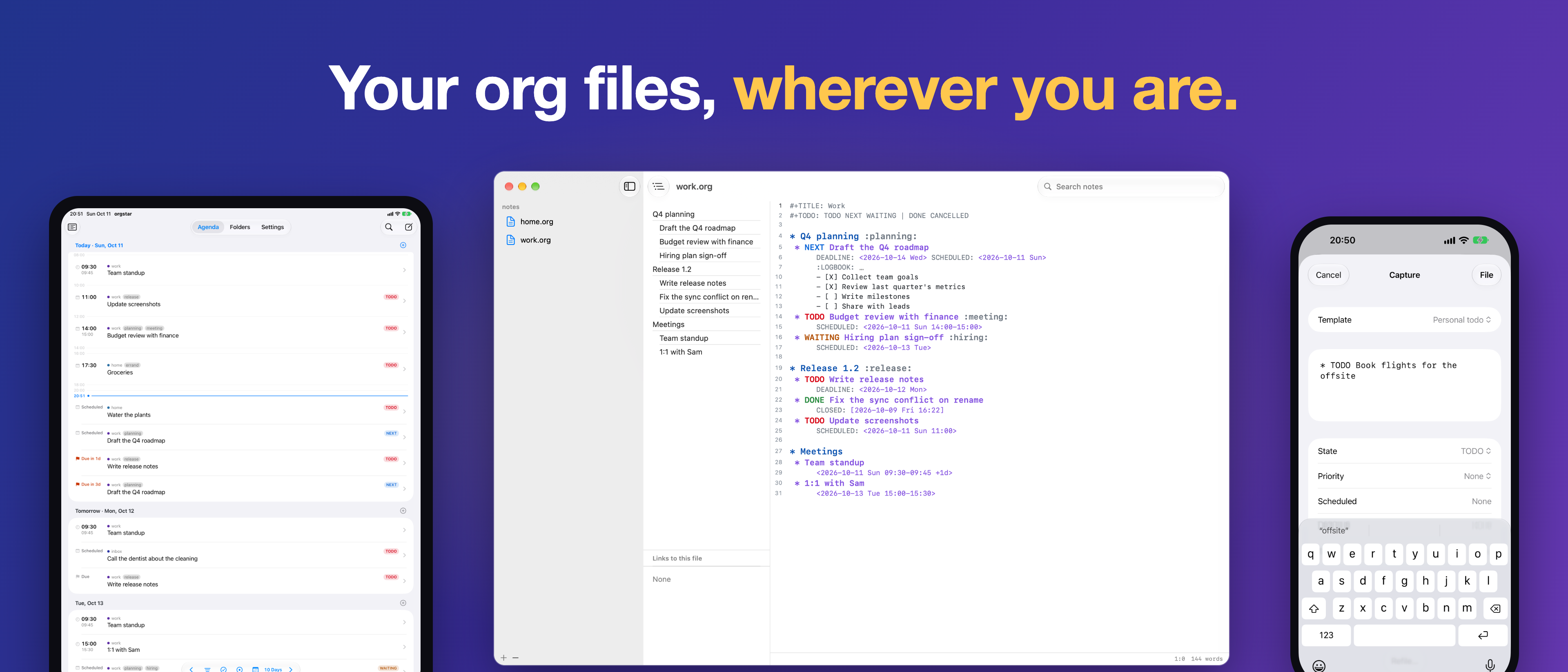
orgstar is an editor for Org mode files on the Mac, iPhone and
iPad. It reads and writes the same plain-text .org files Emacs does, and leaves every
byte you didn't change as it was, so Emacs, the Mac app, the iOS app and your sync tool
can all work on the same folder.
Download on the App Store · Download for Mac · Manual · Screenshots
Your files stay yours
There is no database of your notes and no account. orgstar works on folders you choose, in iCloud Drive, a Syncthing folder or anywhere else, and keeps only an index for search and the agenda, rebuilt from the files whenever they change. Open the same files in Emacs tomorrow and nothing has been reformatted.
What it does
- Editor. Headings, TODO keywords, priorities, tags, timestamps, links, lists, tables and source blocks, styled as you type. Folding, structure editing, and Emacs, Mac or Doom (Vim) keys.
- Agenda. Scheduled items, deadlines and timestamps from all your files, by day, with habits and Calendar events. On the Mac, a board shows entries as a table or as kanban columns.
- Capture. Capture templates as in Org, from a global shortcut, the share sheet,
Shortcuts, widgets, or
org-protocol://links, so existing browser bookmarklets work unchanged. - Clocking. Clock in and out of entries, with clock reports and a Live Activity on iPhone.
- Tables. Aligned as you type, with
#+TBLFMformulas. - Code blocks. Run source blocks and tangle them into files, as
org-babel-tangledoes. - Export. HTML and Markdown built in; PDF, LaTeX, ODT and more through Emacs when it is installed.
- Search. Across file names, headings and text, plus Spotlight and Quick Look
previews of
.orgfiles.
Coming from Emacs
orgstar behaves the way Org does where the two overlap. Settings ▸ General ▸ Import from
Emacs reads an existing Emacs or Doom configuration and carries over its org settings,
folders, capture templates, key bindings and agenda views. Settings live in plain files
under ~/.config/orgstar/, so they can sit in your dotfiles next to your Emacs config.
Get it
On the Mac (macOS 26 or later), with Homebrew:
brew tap krz/tap https://gitbay.org/krz/homebrew-tap.git
brew install --cask orgstar
or download the notarized DMG from the releases page. iPhone and iPad (iOS 26 or later): App Store.
To build from source or contribute, see CONTRIBUTING.html.
License: 0BSD.
Clone
SSHgit clone ssh://git@gitbay.org/krz/orgstar.gitgit clone https://gitbay.org/krz/orgstar.git