api/README.md
93 lines · 3838 bytes
11 symbols in this file
1
2# Awesome Privacy API
3
4The API allows you to browse awesome-privacy's data programmatically. It also runs some lookups/checks on listings to surface useful insights to add additional context to listings, and save time when comparing software / services.
5
6> [!IMPORTANT]
7> It's very important not to rely on this data for any decision making, as it only gives a very narrow slice of the picture. There's also many real privacy issues which the automated lookups have no way of detecting, as well as the possibility for false positives/negatives. Always do your own research.
8
9These endpoints are used by as part of the website generation, the PR review process and the scheduled listing audits. You're also free to use it for your own purposes.
10
11## Endpoints
12
13For a full list of endpoints and usage, see the [API Docs](https://api.awesome-privacy.xyz) or download the [`openapi.json`](https://api.awesome-privacy.xyz/openapi.json).
14
15Listing data
16- Categories
17- Sections
18- Listings
19- Search
20- Stats
21
22Enrichment data
23- Privacy policy summary, score and data
24- Known security vulnerabilities and scorecard
25- GitHub repo health, license, versioning, contributors, etc
26- Android trackers, permissions and de-googled compatibility
27- iOS app versioning, size, reviews and info
28- Docker container info
29- Website security and hosting summary
30- Third-party trackers loaded by a website (via DuckDuckGo's tracker blocklist)
31- Community overview, from Discord, Reddit and Mastadon
32
33---
34
35## Development
36Start by cloning the repo `git clone git@github.com:lissy93/awesome-privacy.git` then `cd awesome-privacy/api`
37
381. `bun install` - Install dependencies
392. `bun run build:data` - Build the data from `awesome-privacy.yml`
403. `bun run dev` - Start the development server (then open `http://localhost:8787`)
41
42Or, to build + run the Docker container, use:
431. `docker build -t awesome-privacy-api .`
442. `docker run -p 8787:8787 --env-file .env awesome-privacy-api`
45
46Before committing, make sure all checks pass:
47- `bun run lint` - Linting
48- `bun run typecheck` - TS typechecking
49- `bun run format:check` - Check formatting
50- `bun run test` - Run the test suite
51- `bun run smoke` - Quick smoke test
52
53---
54
55## Deployment
56
57#### Option 1: Docker
58Use `docker run -p 9000:8787 lissy93/awesome-privacy-api`, then pop open `localhost:9000`
59
60#### Option 2: Bare Metal
61Follow the [development](#development) setup above, then run `bun start` to start the production server on `:8787`
62
63#### Option 3: Cloudflare
64Run `bun run deploy`. You'll need wrangler, and to be authenticated.
65
66<details>
67<summary>authenticating</summary>
68
69I recommend you use API token for this, as then you can scope it as narrowly as possible.<br>
70Head to [dash.cloudflare.com/profile/api-tokens](https://dash.cloudflare.com/profile/api-tokens), then create one just like shown below.<br>
71Then, set `CLOUDFLARE_API_TOKEN` and `CLOUDFLARE_ACCOUNT_ID` env vars in the context you run deploy in.
72
73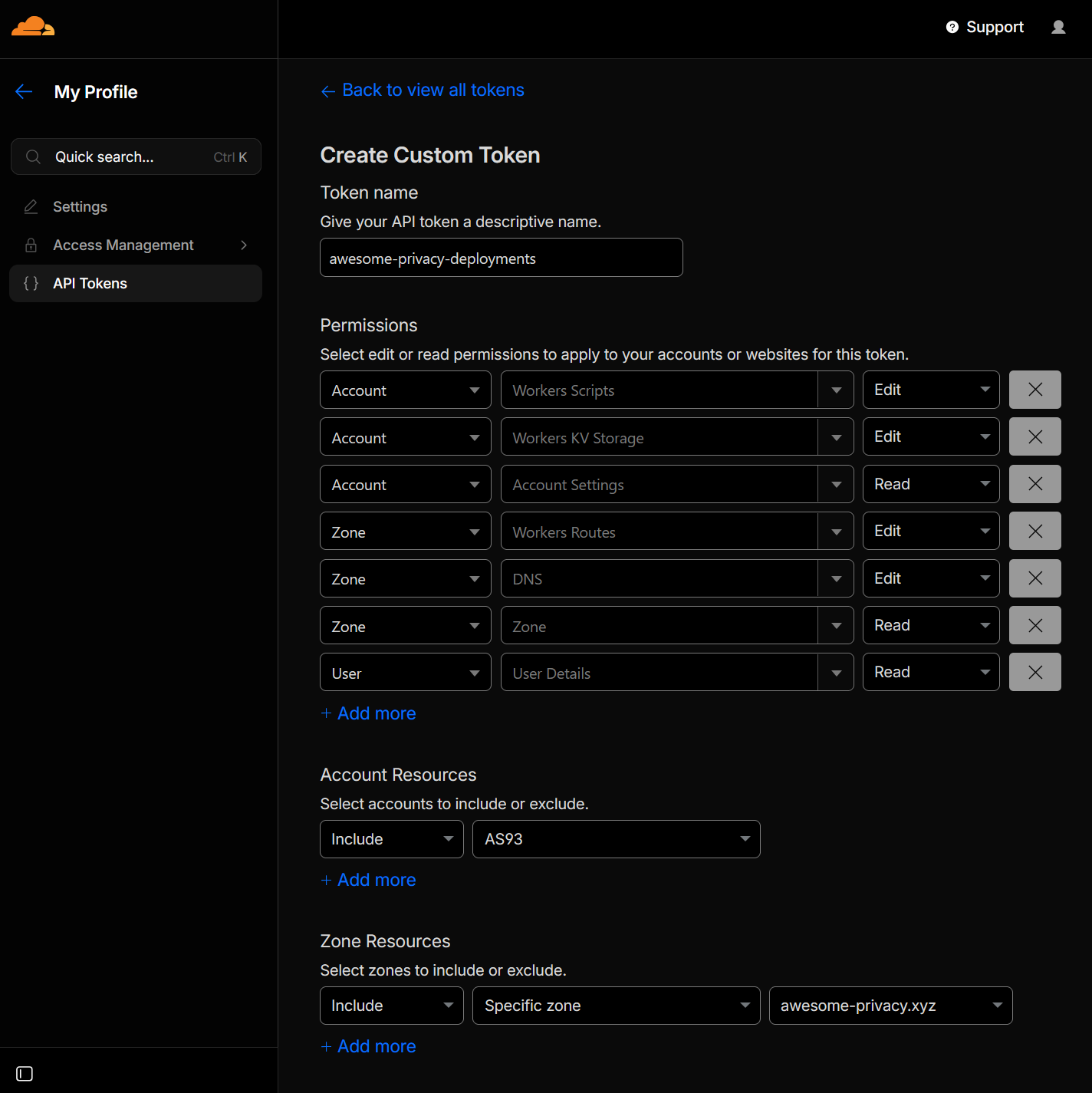
74
75</details>
76
77---
78
79## Configuring
80By default no extra config needed.
81
82#### Authentication
83All endpoints are publicly exposed by default. You can change this, by setting an `API_TOKEN` env var, which will then require the `Authorization: Bearer <token>` header on the `/enrich/*` endpoints.
84
85#### Caching
86If a KV is configured, then results from the enrich endpoints can be cached for a configurable amount of time once a success response if returned. This reduces load on upstream services.
87
88#### Third-party fetching
89Some of the enrich endpoints can also fetch from upstream providers to get some additional context. Some of these need API keys, if these keys aren't present, then those checks will just be skipped.
90- `DISCORD_BOT_TOKEN`
91- `APIVOID_API_KEY`
92- `EXODUS_TOKEN`
93- `GITHUB_TOKEN`