README.md
188 lines · 5161 bytes
1<div align="center">
2 <h1><img width="200" height="200" src="docs/iamb.svg"></h1>
3
4[](https://github.com/ulyssa/iamb/actions?query=workflow%3ACI+)
5[][crates-io-iamb]
6[](https://matrix.to/#/#iamb:0x.badd.cafe)
7[][crates-io-iamb]
8[](https://snapcraft.io/iamb)
9
10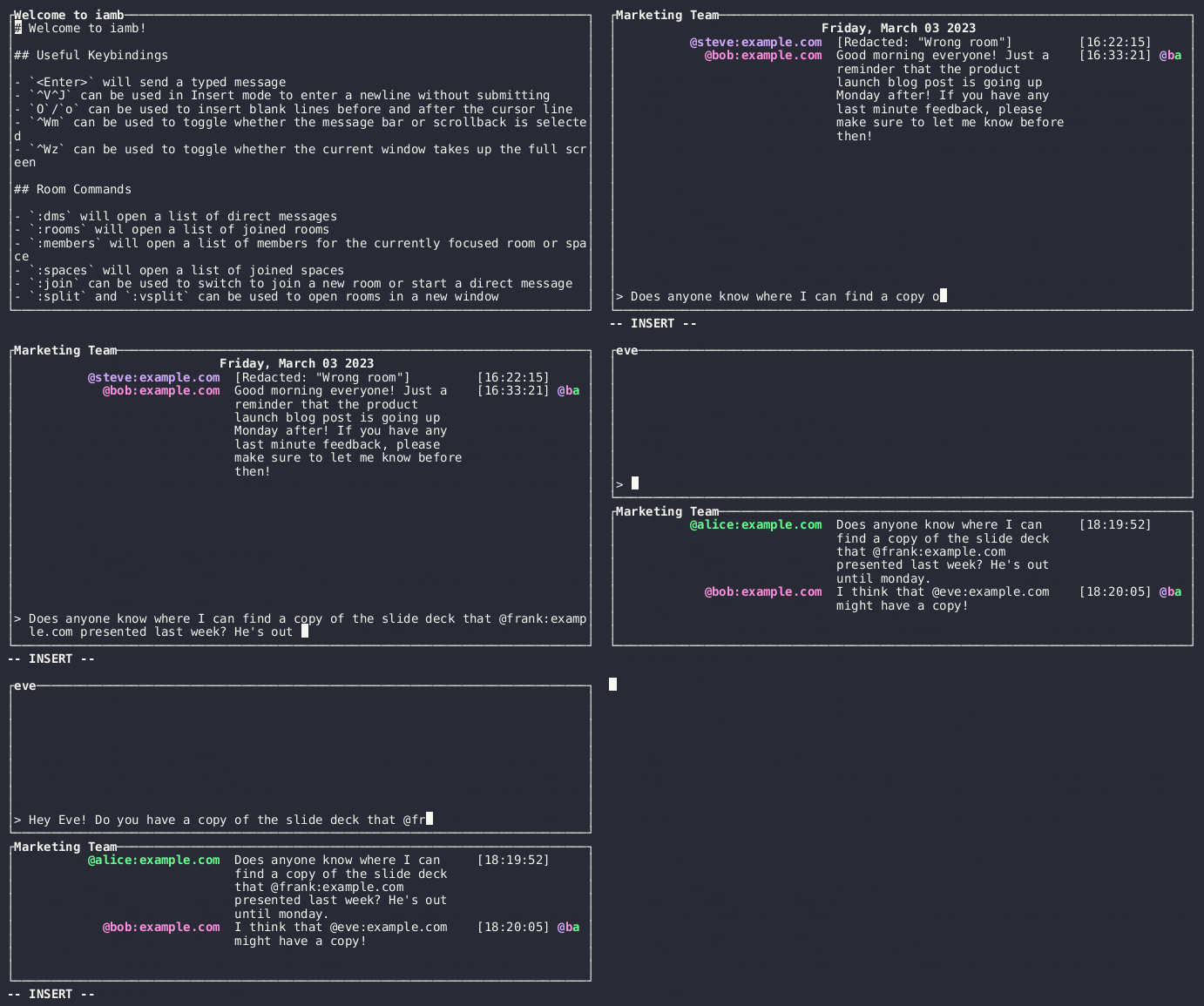
11
12</div>
13
14## About
15
16`iamb` is a Matrix client for the terminal that uses Vim keybindings. It includes support for:
17
18- Threads, spaces, E2EE, and read receipts
19- Image previews in terminals that support it (sixels, Kitty, and iTerm2), or using pixelated blocks for those that don't
20- Notifications via terminal bell or desktop environment
21- Send Markdown, HTML or plaintext messages
22- Creating, joining, and leaving rooms
23- Sending and accepting room invitations
24- Editing, redacting, and reacting to messages
25- Custom keybindings
26- Multiple profiles
27
28_You may want to [see this page as it was when the latest version was published][crates-io-iamb]._
29
30## Documentation
31
32You can find documentation for installing, configuring, and using iamb on its
33website, [iamb.chat].
34
35## Configuration
36
37You can create a basic configuration in `$CONFIG_DIR/iamb/config.toml` that looks like:
38
39```toml
40[profiles."example.com"]
41user_id = "@user:example.com"
42```
43
44If your homeserver is located on a different domain than the server part of the
45`user_id` and you don't have a [`/.well-known`][well_known_entry] entry, then
46you can explicitly specify the homeserver URL to use:
47
48```toml
49[profiles."example.com"]
50url = "https://example.com"
51user_id = "@user:example.com"
52```
53
54## Installation (from source)
55
56Install Rust and Cargo using [rustup], and then run from the directory
57containing the sources (ie: from a git clone):
58
59```
60cargo install --locked --path .
61```
62
63If you're willing to wait longer on the build, you can use the `release-lto`
64profile to enable link-time optimization:
65
66```
67cargo install --profile release-lto --locked --path .
68```
69
70If you would prefer to optimize for a smaller binary, you can use the
71`release-light` profile, which will do LTO, optimize code generation
72for smaller output, and strip the binary. The `max_level_error` feature
73will also make sure that any `tracing` logs below the error level have
74their strings removed during compile-time, so that you only get `error`
75logs.
76
77```
78cargo install --profile release-light --features max_level_error --path .
79```
80
81Add `--no-default-features` if you want to skip desktop integration (e.g.
82clipboard and notifications support) and you would like to link against
83your system's OpenSSL and SQLite instead of using rustls and a bundled
84SQLite.
85
86## Installation (via `crates.io`)
87
88Install Rust (1.83.0 or above) and Cargo, and then run:
89
90```
91cargo install --locked iamb
92```
93
94See [Configuration](#configuration) for getting a profile set up.
95
96## Installation (via package managers)
97
98### Arch Linux
99
100On Arch Linux a [package](https://aur.archlinux.org/packages/iamb-git) is available in the
101Arch User Repositories (AUR). To install it simply run with your favorite AUR helper:
102
103```
104paru iamb-git
105```
106
107### FreeBSD
108
109On FreeBSD a package is available from the official repositories. To install it simply run:
110
111```
112pkg install iamb
113```
114
115### Gentoo
116
117On Gentoo, an ebuild is available from the community-managed
118[GURU overlay](https://wiki.gentoo.org/wiki/Project:GURU).
119
120You can enable the GURU overlay with:
121
122```
123eselect repository enable guru
124emerge --sync guru
125```
126
127And then install `iamb` with:
128
129```
130emerge --ask iamb
131```
132
133### macOS
134
135On macOS a [package](https://formulae.brew.sh/formula/iamb#default) is available in Homebrew's
136repository. To install it simply run:
137
138```
139brew install iamb
140```
141
142### NetBSD
143
144On NetBSD a package is available from the official repositories. To install it simply run:
145
146```
147pkgin install iamb
148```
149
150### Nix / NixOS (flake)
151
152```
153nix profile install "github:ulyssa/iamb"
154```
155
156### openSUSE Tumbleweed
157
158On openSUSE Tumbleweed a [package](https://build.opensuse.org/package/show/openSUSE:Factory/iamb) is available from the official repositories. To install it simply run:
159
160```
161zypper install iamb
162```
163
164### Snap
165
166A snap for Linux distributions which [support](https://snapcraft.io/docs/installing-snapd) the packaging system.
167
168```
169snap install iamb
170```
171
172### Conda (Linux, macOS, Windows)
173
174A Conda [package](https://prefix.dev/channels/conda-forge/packages/iamb) is available on conda-forge. To install it simply run:
175
176```
177pixi global install iamb
178```
179
180## License
181
182iamb is released under the [Apache License, Version 2.0].
183
184[Apache License, Version 2.0]: https://github.com/ulyssa/iamb/blob/master/LICENSE
185[crates-io-iamb]: https://crates.io/crates/iamb
186[iamb.chat]: https://iamb.chat
187[well_known_entry]: https://spec.matrix.org/latest/client-server-api/#getwell-knownmatrixclient
188[rustup]: https://rustup.rs/