docs/glossary/audio.md
714 lines · 67378 bytes
1---
2title: Audio Glossary
3customDescription: Audio terms that you need to know
4outline: [1,2]
5og:
6 image: https://i.wotaku.wiki/f/glossary.png
7---
8
9
10
11<GradientCard title="Audio Glossary" description="Audio concepts that you need to know." theme="turquoise" variant="thin"/>
12
13
14
15<Authors page="audiog" />
16
17
18
19
20
21# Basic Terms
22
23## Audio File
24| Terms | Details |
25| ---- | ---- |
26| Bitrate | The bitrate of an audio file is the number of bits of audio data stored per second, which can be variable or constant based on the encoding. [**Learn more :mdi-arrow-top-right:**](#bit-rate) |
27| Lossy | Lossy codecs aim to make file sizes small, even if it means compromising in quality. Quality of the sound varies wildly between formats and bitrates, with higher bitrates sounding better. Beyond the [transparency threshold](#transparency-threshold), everything will sound the same. [**Learn more :mdi-arrow-top-right:**](#lossy) |
28| Lossless | Lossless, also known as lossless compression, which is compression that preserves all data from the source file. Lossless compression is completely indistinguishable from the source file. [**Learn more :mdi-arrow-top-right:**](#uncompressed-lossless) |
29| Spectrogram | A measure of frequency density over time. A spectrogram can be viewed as a graph, with frequency density represented by color. The spectrogram can be used to scrutinize the quality of an encoding. [**Learn more :mdi-arrow-top-right:**](#spectrogram) |
30
31
32## Release
33| Terms | Details |
34| ---- | ---- |
35| Single | A music release containing 1 or 2 songs. |
36| Maxi Single | Another term for EP, mostly used in Europe. |
37| EP | Extended Play, a release usually containing 4 to 6 tracks. |
38| LP | Long Play, a full album release usually containing 10 to 12 tracks. |
39| Album | An album is a collection of songs, either by a singular artist, vocalist, producer, or label. Sometimes, albums can even be compilations of multiple unrelated parties. |
40| Compilation | An album compiling tracks from different recordings of one or multiple artists. |
41| Label | A company that publishes, distributes and promotes the music of their affiliated artists. The three biggest are [**Sony**](https://en.wikipedia.org/wiki/Sony_Music_Group), [**Universal**](https://en.wikipedia.org/wiki/Universal_Music_Group) & [**Warner**](https://en.wikipedia.org/wiki/Warner_Music_Group). |
42
43## Hardware
44| Terms | Details |
45| ---- | ---- |
46| IEM | Short for “In Ear Monitor”. These are much like earbuds, however, they have nozzles and tips attached to the end where audio comes out. This makes it such that the “monitor”, or speaker, goes “in ear”. Earbuds, alternatively, will rest on the ear canal without actually going in. The benefit of an IEM is that it creates a seal within your ear, which can allow for the bass response to be maintained much easier. [**Learn more :mdi-arrow-top-right:**](#in-ear-monitor) |
47| DAC | Short for “Digital-to-Analog Converter”. In terms of music, the DAC is the part of the chain that converts source files into analog signals that a headphone, speaker, or IEM can play back. [**Learn more :mdi-arrow-top-right:**](#dac) |
48| Amp | Short for “Amplifier”. In terms of music, the amp takes the converted signal from a DAC, or other analog source, and increases that signal's amplitude. This process is what makes audio louder. Any time you interact with a knob or volume rocker in order to make music louder or quieter, odds are you're interfacing with an amplifier. [**Learn more :mdi-arrow-top-right:**](#amp) |
49| Speaker | Speakers shoot sound out towards the user. They consist of a subwoofer, woofer and tweeter. The subwoofer is usually disconnected from the woofer and tweeter pairing. [**Learn more :mdi-arrow-top-right:**](#speaker) |
50
51
52## Tools
53
54| Terms | Details |
55|-|-|
56| DAW | Digital Audio Workstation (DAW) is software used for recording, editing, mixing, and producing audio files. DAWs offer a comprehensive environment for creating music, podcasts, sound design, and other audio projects, combining tools for sequencing, synthesis, and audio processing. Users can manipulate audio tracks, apply effects, and integrate virtual instruments all within a single platform. Examples of popular DAWs include FL Studio, Ableton Live, Cubase, Pro Tools, Reaper, and Logic Pro. Each DAW offers unique features and workflows, catering to different styles of music production and audio engineering needs. |
57| Voice synthesizer | Voice synthesizers (e.g., Vocaloid, Synthesizer V, UTAU) work by taking user input in the form of musical notes and lyrics, then processing this input to generate a synthesized singing voice. They're created using voice banks, which consist of recordings of real people's voices. Each voice bank is typically designed for a specific language and while it is possible to create songs in other languages using them, it requires more fine-tuning to achieve good results. |
58
59
60
61
62
63# Audio file
64
65## Audio Signal
66
67| Type | Description |
68|-|-|
69| Physical | Physical audio signals are produced by vibrating resonant objects. These vibrations travel through a medium (solid, liquid, or air) and form continuous wave functions. |
70| Analog | An analog audio signal is a continuous wave function, characterized by a constantly changing voltage. Microphones or other receivers convert physical audio signals into analog signals. This continuous nature means the signal contains an infinite number of data points, making direct digital processing impractical. |
71| Digital | A digital audio signal is also a wave function. It is discrete, meaning that there are only two logical states of potential. These waves can be interpreted as logical 1s and 0s, allowing for complex logical operations. |
72
73
74::: details Pulse Code Modulation (PCM)
75PCM (Pulse Code Modulation) is the most widely used audio encoding method. It involves sampling the audio signal at regular intervals and quantizing the amplitude of each sample into a discrete value. Music is generally recorded in a PCM format. Here are a few related terms for PCM:
76
77
78- **Sample Rate**: The number of samples taken per second from the analog audio signal.
79- **Bit Depth**: The number of levels used during quantization. These levels define the number of amplitudes available to the encoder. Higher levels mean a wider range of amplitudes per sample.
80- **Channel**: The number of individual audio signals in the recording (e.g., mono, stereo).
81:::
82
83::: details Direct Stream Digital (DSD)
84Direct Stream Digital (DSD), a product developed by [Sony & Philips](https://www.sony.net/Products/DSD/), is known for its high-resolution audio quality. However, DSD files are relatively rare due to their low popularity. Several factors contribute to this, including their huge file size, the difficulty in mastering and editing during production, and the greater efficiency of PCM files in various aspects.
85
86DSD is an audio encoding method that uses 1-bit delta-sigma modulation. It samples the audio signal at a very high sample rate, representing changes in signal density rather than amplitude levels, and has only 1 bit of amplitude. The most popular DSD standard is .dsf, but there are other standards as well.
87
88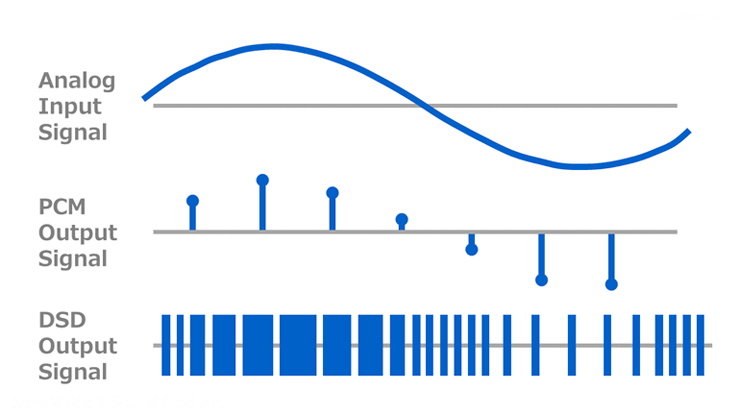
89
90DSD files can be classified based on their sampling rate:
91
92| DSD Type | Sampling Rate | Relation to CD Audio (44.1kHz) |
93|------------|---------------------|---------------------------------|
94| DSD64 | 2.8224 MHz | 64 times |
95| DSD128 | 5.6448 MHz | 128 times |
96| DSD256 | 11.2896 MHz | 256 times |
97| DSD512 | 22.5792 MHz | 512 times |
98| DSD1024 | 45.1584 MHz | 1024 times |
99
100DSD’s high sampling rate allows for a wide dynamic range, even with a 1-bit depth. Factors like noise shaping and dithering also contribute to the audio quality. Noise shaping moves noise to the ultrasonic range. For example, DSD64 files start to see noise increase past 20kHz, requiring the DAC to filter it out. Higher DSD rates experience less noise rise, pushing it further into the ultrasonic range and making noise shaping more linear, which eases the DAC's job.
101
102
103
104
105:::
106
107
108## Analog to Digital
109
110Analog signals are signals with an alternating current. The “analog” part refers to how the signal usually correlates to some sort of physical property. For example, a signal generated by a power generator would be analogous to the speed at which the rotation of the generator occurs. In terms of audio, the signal will correlate to the oscillation of the driver used to reproduce the sound. In other words, how the sound would vibrate through the air.
111
112In order to process the analogous signals digitally, we need to perform a process called discretization. This allows for analog signals to be represented in either their amplitude or time domains for digital analysis.
113
114- Discretization of time -> Sampling
115- Discretization of amplitude -> Quantization
116
117
118### Sampling
119Sampling is the process of taking a signal and splitting it based on an algorithm. Sampling can be done in the frequency, amplitude, or time domains. Each process involves processing the data differently, but allows for accurate reproduction of an analog signal in the digital realm.
120
121When referring to audio signals, sampling is the process of splitting signals by time (Hz). This allows for every single frequency in the audible spectrum to accurately be recorded. Learn more about this in [**sample rate :mdi-arrow-top-right:**](#sample-rate).
122
123
124
125
126### Quantization
127Quantization is the process of sampling an analog audio signal and converting it into a digital format. This is performed by taking periodic samples of the audio waveform and recording the amplitude of the analog signal at each sample. This process is done through an approximate measurement. As such, an inherent error exists for every single amplitude recording. This error will manifest as a “noise floor”, or noise that exists below a decibel threshold. Higher bit depths can be utilized in order to reduce this error, but the noise will always exist in the signal chain.
128
129
130
131
132
133## Sample Rate
134The amount of samples taken from the analog audio signal per cycle is known as the sample rate. As it's a per-second measurement, the unit is Hz (Hertz). Hertz are a measurement of frequency, or how many periods of a wave exist per second.
135
136A higher sample rate means more data points are taken per second. This doesn't necessarily result in a higher quality signal. A higher sample rate allows for the sampling of larger frequencies, but for the human audible spectrum, there are no advantages.
137
138For listeners, 44.1kHz is sufficient to represent all humanly audible frequencies. 44.1kHz is the standard sampling rate for CDs, and 48kHz is the standard for DVDs and streaming services (originally brought forth to aid in timing with TV broadcasts). There is no functional difference between the two, beyond resampling issues that may arise between the mediums.
139
140Higher sampling rates are often desirable by producers as it allows them to modify the audio more flexibly without adding additional noise. It's not really relevant for playback.
141
142::: details Dithering
143Dithering is a process used when converting from different bit widths. Converting raw audio data to a different bit width will induce quantization errors during the conversion process. These are errors caused by averaging amplitudes. A dither signal can be applied to the audio before conversion, which is effectively noise. While noise may seem undesirable, it actually improves the quantization and significantly reduces the errors during the conversion. The noise is not perceivable to humans, and does not effect the quality of a mix whatsoever.
144:::
145
146::: details Nyquist–Shannon Sampling Theorem
147Nyquist Sampling Theorem dictates how sampling should be done in order to avoid aliasing. The primary technique is to utilize a sample rate that is twice that of the desired maximum frequency. To ensure that the entire spectrum is being sampled, a very small margin should be added to the sample frequency. For example, while the human hearing spectrum is said to cap out at 20kHz, the desired sampling frequency was chosen to be 20.05kHz. A small margin such as this aids in ensuring the desired frequencies are captured during sampling. The sample rate for audio was thus twice that value, or 44.1kHz.
148
149Another condition is bandlimiting. During the conversion of signals, high frequency distortion is added to the result. A band-pass filter helps to isolate the target frequencies from this distortion. Aliasing occurs if this distortion is not filtered. The folded wave interferes with the main wave and creates a new, unwanted sound wave.
150
151
152
153
154
155To remove aliasing, a low pass filter (aka anti-aliasing filter) is added into both the ADC and DAC. Software will additionally include filters to remove aliasing in digitally generated audio signals. It's not practically possible to remove higher frequencies at the desired Nyquist frequency, so a buffer space is kept between the desired frequency and the Nyquist frequency. The buffer space depends on hardware capability.
156
157
158
159
160
161>Learn more about the [**Nyquist sampling theorem :mdi-arrow-top-right:**](https://en.wikipedia.org/wiki/Nyquist%E2%80%93Shannon_sampling_theorem).
162
163:::
164
165
166## Bit Depth
167
168
169Bit depth indicates how many levels are used during quantization. Bit depth, also known as the number of levels, is defined by a power of **2<sup>levels of bit depth</sup>**.
170- 8bit -> 256 levels
171- 16bit -> 65,536 levels
172- 24bit -> 16,777,216 levels
173
174
175The increase in levels is exponential. The higher the level number, the closer the amplitude matching between analog and digital signals and the lower the amplitude of the resulting quantization noise.
176
177
178Increasing the bit depth blindly is counter-intuitive. For example, increasing the bit depth from 16 to 24 bits produces a barely perceivable enhancement. The file size, however, becomes much larger with the increase in depth.
179
180
181::: details Dynamic Range
182The dynamic range is the distance between the loudest and quietest sounds within a mix. The range can be calculated using this formula,
183
184___
185
186**Signal-to-Quantization-Noise Ratio = 20log(2<sup>bit depth</sup>)dB + 1.76dB**
187
188___
189
190This formula provides the following dynamic ranges: (without any dithering applied),
191- 8bit -> 49.93dB
192- 16bit -> 98.089dB
193- 24bit -> 146.25dB
194
195
19616-bit audio produces a maximum possible undithered dynamic range of ~96 dB, and with noise-shaped dithering applied, the dynamic range can increase upwards of 120dB. A average quiet home room won't have a significantly lower noise floor than 30 - 40dB. The minimum threshold at which a listener should experience a noise floor louder than that of ambient noise is well beyond the point where one would cause damage to their hearing. Bit depths greater than 16 are far more relevant for audio processing, rather than playback.
197
198
19924-bit audio possesses a dynamic range exceeding the human hearing capabilities. With the increase in file size, it may be hard to justify the storage of these higher bit width files.
200
201:::
202
203
204## Bit rate
205Bit rate is the amount of data streamed per second. For an audio file, there are three types:
206
207
208| Bit Rate Types | Description |
209|-|-|
210| Constant (CBR) | The bit rate remains constant throughout the entire file (including bits storing silence). Since the bit rate is constant, the file size is more predictable. |
211| Variable (VBR) | VBR adjusts the bit rate based on content complexity, which can lead to a more efficient use of bits, as well as smaller file sizes when compared to CBR encoding. |
212| Average (ABR) | ABR is a middle ground between CBR and VBR. The bitrate is allowed to fluctuate, so long as an average value is maintained. This is considered an inferior standard when compared to the other two. |
213
214
215## Codec
216A codec is a standard used to encode and decode a data stream. Using codecs, data is stored in a container. Codecs are one of the most important factors in determining audio quality. There are several codecs used in the audio medium.
217
218
219| Type | Codec |
220|---|---|
221| Uncompressed Lossless | WAV, AIFF |
222| Compressed Lossless | FLAC, ALAC, APE, WavPack |
223| Compressed Lossy | MP3, Vorbis, Opus, AAC |
224
225
226### Uncompressed Lossless
227Uncompressed lossless codecs are pretty old. They use CBR/Constant Bitrate encoding. CBR encoding ensures no data is lost, but the resulting file size is very large. WAVs consist of only a header, metadata, and raw quantization metrics. Devices can easily perceive this sort of encoding, leading to its relevance even today. As such, it's still widely used in music studios. As a consumer, they remain a bloated and unwanted format.
228
229
230### Compressed Lossless
231Lossless refers to lossless compression, which is compression that preserves all data from the source file. In terms of music, lossless compression is completely indistinguishable from the source file, while also reducing space and increasing efficiency of playback when compared to its uncompressed counterpart. Common lossless encoding formats include FLAC or ALAC. They are usually sourced from WAV files. They generally use VBR/Variable Bitrate encoding. The resulting file sizes are much smaller when compared to uncompressed lossless formats.
232
233### Lossy
234Lossy compression, also known simply as lossy, is a data compression technique that reduces file size by selectively removing or approximating some of the original data from the source file. While this process discards certain information, modern algorithms are designed to do so in a way that minimizes perceptible differences from the original, making it nearly indistinguishable in quality for most users at certain bitrates. Common formats utilizing lossy compression include MP3, AAC, and OPUS.
235___
236#### Transparency Threshold
237Transparency means that the compression of the original file is accurate to a degree such that a listener can't distinguish between the compressed and original files. The level or threshold of transparency depends on the listeners hearing ability, hardware, and the compression method. Since it's based on hearing ability, transparency is very subjective. The more efficient the codec is, the better it will sound **below its perceptually transparent bitrate**. In general, encoding quality follows the trend Opus > AAC ≈ Vorbis > MP3. The bit rates at which lossy audio files become transparent are subjective but the following are common choices of bitrates:
238
239
240| Codec | Transparency Threshold |
241|-------|---------------------|
242| Opus | 128 - 160kbps |
243| AAC | 128 - 160kbps |
244| Vorbis| -q5 - -q6 |
245| MP3 (CBR) | 256kbps (Joint Stereo Encoding) - 320kbps (Full Stereo Encoding) |
246| MP3 (VBR) | Between -V3 and -V0 |
247
248
249## Spectrogram
250
251Spectrograms a.k.a spectral analysis are a reliable method to identify audio quality. Spectrograms plot the frequency spectrum across the time domain. Perceived loudness of these frequencies are represented by the color of the wave. The colors can then be decoded into a decibel rating from the legend on the right. This type of graph is useful in determining the sort of compression applied to an audio file. The depth at which these frequencies extend into the higher ranges indicate the type of compression utilized. Here, Spek has been used to analyze. The following are a couple of examples of different levels of quality:
252
253:::tabs
254
255== FLAC 24/48
256
257
258
259The above figure is a spectrogram of a 24 bit, 48kHz FLAC. A 48kHz FLAC can support frequencies up to 24kHz. This value comes from halving 48kHz (following [Nyquist–Shannon Sampling Theorem](#sample-rate)).
260
261== FLAC 16/44.1
262
263
264
265This is a spectrogram of a 16 bit, 44.1kHz FLAC file. A 44.1kHz FLAC file can support frequencies up to 22.05kHz. This spectrogram shows frequencies up to around 50dB extending up to 22.05kHz, which is a great indicator of a truly lossless file.
266
267
268
269This 16 bit 44.1kHz FLAC was transcoded from a 24 bit 48kHz FLAC. Some of the data above 21.5kHz is missing after the conversion. Although this conversion was from a lossless source and to a lossless source, it's technically not a lossless conversion. Data was lost, even though all of it is above the threshold of human hearing. This is due to the low pass filter applied below 20kHz. A low pass filter has already been applied during the encoding of the 24 bit FLAC. Transcoding down to a lower sample rate applies this low pass filter again to prevent aliasing. This process usually causes the highest frequencies to be filtered out. This phenomenon can be observed when encoding in a different sample rate from the source. Either increasing or decreasing the sample rate causes some minor distortions between source files. Many different algorithms called SRC (Sample Rate Converters) exist and have varying degrees of effectiveness in mitigating these distortions. Generally, the distortions should not be perceivable by the average listener, but it's worth mentioning for sake of file integrity.
270
271== MP3 320
272
273
274
275This spectral is of a CBR 320kbps MP3 transcoded from a FLAC. The hard cutoff at 20.5kHz is a good indicator of this sort of compression. Normally, frequencies wont extend all the way to 20.5kHz. The frequency rolloff is much sharper than that of a FLAC file. A very loud noise must be present at higher frequencies in order for the data to persist to 20.5kHz. Functionally, data will usually cutoff closer to 20.2kHz. MP3s of any encoding style apply a softer cutoff, also known as a frequency shelf, around 16kHz.
276
277
278
279The following is the proof that a CBR MP3 320 can reproduce frequencies at 20.5kHz. 2 different sample rates were used, at 48kHz and 44.1kHz respectively. These spectrograms resulted from transcoding a 24 bit 96kHz FLAC of a frequency sweep. The line is the frequency increasing linearly over time. The figure above depicts the source FLAC.
280
281
282
2832 lines are drawn on the figure. The top line is the highest perceivable frequency in the measurement, including the back distortion generated by the downsampling process. For the 48kHz measurement, this line easily clears the 20.5kHz mark. The second yellow line is measured from the highest perceivable frequency independent of the back distortion. This measurement appears to be at 20.5kHz. Independent of how you choose to interpret the distortion, the MP3 contains the data.
284
285
286
2872 lines are drawn on the figure. The top line is the highest perceivable frequency in the measurement, including the back distortion generated by the downsampling process. For the 44.1kHz measurement, this line appears slightly below the 20.5kHz mark. The second yellow line is measured from the highest perceivable frequency independent of the back distortion. This measurement appears to be around 20.2kHz. A 44.1kHz MP3 probably can't hit 20.5kHz.
288
289== Opus 256
290
291
292
293This spectral depicts a VBR Opus at 256kbps. The Opus codec is much more efficient than MP3, especially at lower bitrates. Opus 256 has a hard cutoff of 20kHz, with no perceivable shelf, unlike MP3. Comparing the spectral to a FLAC, it almost looks like the frequencies about 20kHz were chopped off and the rest of the spectrum was left untouched. This makes it a superior format in almost every way than an equivalent high bitrate MP3.
294
295== MP3 V0
296
297
298
299This is a spectral of a V0 variable bitrate MP3, or V0 VBR MP3. V0 is the highest quality encoding preset. Frequencies extend up to about 22kHz, much like that of a 16 bit lossless FLAC. This form of encoding is still a lossy compression, however. Much of the data beyond 19.5kHz is heavily stripped out. The preserved data, for the most part, is also outside of the listenable range. Generally, this format is comparable to an MP3 CBR 320. CBR 320 is generally accepted as a better standard, in terms of raw data preservation. A 16kHz shelf can be observed, a common result of MP3 encoding.
300
301
302
303This spectral is very similar to the previous, however, a 19.5kHz low pass filter has been applied. This is a common practice among V0 encoding. As the data above 19.5kHz has already been tampered with, and most of that data is transparent, some encoders filter it out by default. This process reduces file size, increasing the efficiency of the codec.
304
305== MP3 192
306
307
308
309This spectrogram is of a CBR 192kbps MP3. The source was a FLAC. Frequencies no longer extend past 19kHz, and the MP3 shelf remains at 16kHz.
310
311== YouTube
312
313
314
315YouTube commonly uses Opus for their music library. This spectral is of a 48kHz 256kbps VBR Opus file. The bitrate floats around 245 - 280kbps at any given time. A hard cutoff exists at about 20kHz, but frequencies occasionally persist beyond the cutoff. No discernible shelf is observable.
316
317
318
319Audio quality can vary on youtube for a number of reasons, such as video playback quality and types of encoding. Audio on YouTube usually has an average of around 130kbps. This spectral is of a 48kHz 128kbps VBR Opus file. The bitrate floats around 115 - 145kbps at any given time. A hard cutoff exists at about 20kHz, but frequencies occasionally persist beyond the cutoff. A slight shelf has been applied at 15.5kHz. Compared to the 256kbps Opus, aside from the slight shelf, the spectrals are very close. The quality loss, even at a much lower bitrates, is heavily reduced in the Opus standard.
320
321== Spotify
322
323
324
325Spotify uses Vorbis encoding for its library. The above spectral is of a 320kbps CBR Vorbis file. Comparing this to a FLAC encoding, frequencies beyond 19kHz suffer a soft shelving. Many of the frequencies still bypass the 19kHz threshold, but many quieter frequencies are filtered out at a quicker rate. The rest of the frequency spectrum is left untouched.
326
327
328
329This spectral is of a 160kbps CBR Vorbis file. Comparing the 160kbps Ogg to the 320kbps Ogg, the lower bitrate suffers a decent amount of data loss throughout the spectrum. Frequencies as low as 2kHz seem to be missing between the two spectrals. Unlike a CBR MP3 at 160kbps, frequencies are allowed to extend much higher. Instead of focusing on a frequency region to filter data out of, it instead targets areas within the music that the encoding process deems less necessary.
330
331== Apple
332
333
334
335This spectral is of a VBR 256kbps AAC file, Advanced Audio Codec, or AAC. The bitrate at any given time fluctuates between 216 - 313kbps. A cutoff right before 22kHz can be observed at the top. It can be very hard to notice, however, frequencies are missing when compared to the FLAC equivalent. Especially around areas where the frequencies were already quiet. Instead of a defined shelf, AAC will determine which frequencies can safely be removed without compromising the quality of the mix.
336
337The spec for the lossless 16/44.1:
338
339
340
341== Case 1
342
343
344
345Spectrals vary a lot depending on the genre of music. Ambient piano music could have less frequency data than genres such as mainstream pop. This spectral is of a lossless FLAC file. Frequencies still extend all the way to 22kHz, but they are very low decibels in magnitude. A majority of frequencies don't even hit the 22kHz point. Regardless, it's still a high quality, lossless encoding. Furthermore, lossless 44.1kHz files don't actually have to hit as high as 22kHz. If the producer decided to cut-off frequencies past a certain point, they wouldn't exist, lossless or not. This practice, however, is very rare. [This article](https://splice.com/blog/what-is-a-spectrogram/) is also a great explanation.
346
347== Case 2
348
349
350
351These spectrals depict 24 bit 96kHz FLAC encodes. A significant portion of the file is taken up by empty black space, devoid of audio information. This presents an argument such that a 24 bit 96kHz provides nothing more than bloat. The files can easily be downsampled to a lower sample rate, while preserving a significant amount of the audio data. One last kiss, for example, would be a near lossless conversion. There are only a few moments where frequencies actually appear beyond about 25kHz. A solid 23kHz worth of data is essentially being allocated to nothing.
352
353
354
355The My Dress-Up Darling ED makes much more use of the extra frequency headroom, however, it is already way beyond the threshold of human hearing. High sample rates for audio do play a role within production, allowing for a smoother experience if slowing down audio to a large degree. For playback, however, there is almost no reason for such a high sample rate audio file. If a song is released with such a high sample rate, there is an argument to be made for the preservation of that release. The average listener, however, will not perceive a difference in the form of downsampling the source, or even transcoding it to a lossy format.
356
357:::
358
359In short, analyzing a file can help determine the authenticity of the quality. A FLAC file cant always be taken at face value. If it sounds low quality, it could potentially be the result of a bad transcode. Software such as spek allows the user to analyze music and prevent the sharing of low quality, unwanted encodes.
360
361::: info [**Click here**](https://drive.proton.me/urls/7RZE1Y1K70#7LWs2238Irn5) for higher res specs.
362:::
363
364## Container
365
366Container is the extension name we see at the end of the file. This can be same as codec (e.g., **FLAC** & `.FLAC`) or different (e.g. **ALAC** & `.m4a`). Containers store all the data. The data is (typically) stored in different parts. These structures can change based on the container. This can be oversimplified like this:
367- **Header:** This section contains info about file format, size and signature.
368- **Audio data:** This section is the main part. It contains the encoded audio file.
369- **Metadata:** Metadata can contain info about title, artist, album, genre etc. (e.g., [ID3](https://en.wikipedia.org/wiki/ID3), [Vorbis comment](https://en.wikipedia.org/wiki/Vorbis_comment))
370- **Others:** There can be other parts too containing e.g. cue files.
371
372::: details Example: Ogg Container Structure
373
374`.ogg` is one of the most widely used audio containers. It's very flexible. `.ogg` is structured as a series of pages which makes it easier to stream. Each page contains segments of audio data stream (or the other types of stored encoded media). Here we will describe a watered down version of `.ogg` container structure. You can read the [**full specification here :mdi-arrow-top-right:**](https://xiph.org/ogg/)
375
376
377
378As mentioned before data in `.ogg` container are divided in multiple pages. These pages have identical structure and connect together to give a gapless data stream. The parts in a single page are:
379
3801. **Capture pattern / Sync code:** This number used to ensure sync when parsing `.ogg` file. Also assists in resyncing a parser in cases where data has been lost or is corrupted.
3812. **Version:** The version of the Ogg bitstream format.
3823. **Header type:** It indicates whether the packet is the beginning or ending of the data stream or continuation after the previous packet.
3834. **Granule position:** It is the time marker by the codec which shows the number of samples and/or other data.
3845. **Bitstream serial number:** This is a unique number that identifies a page as belonging to a particular bitstream.
3856. **Page sequence number:** This gives every page a chronological number which starts from 0.
3867. **Checksum:** A CRC32 checksum of the data in the entire page to check whether or not the page is altered or not.
3878. **Page segments:** It indicates the number of segments that exist in this page as well as how many bytes are in the segment table that follows this field. One single page can have max 255 segments.
3889. **Segment table:** To understand this, we need to define three key terms: **segment**, **packet**, and **segment table**.
389
390 - **Segment:** A segment is a small piece of data, up to 255 bytes in size, like a tiny chunk of information.
391 - **Packet:** A packet is the meaningful unit of data that the decoder processes. A packet can consist of one or more segments. If a packet's data is too large to fit into a single segment, it is spread across multiple segments.
392 - **Segment table:** The segment table is a list that specifies the sizes of the segments on a page. Each entry in this table is an 8-bit (1 byte) value that indicates the length of a segment.
393
394 Within the segment table:
395 - If a segment's length is **255**, the next segment is combined with it as part of the same packet.
396 - If a segment's length is between **0 and 254**, this indicates the end of the packet.
397 - If a packet's total length is a multiple of **255**, the final segment will have a length of 0.
398 - If the last packet continues onto the next page, the final segment’s length is **255**, and a continuation flag on the next page signals that the packet continues from the previous page.
399
40010. **Metadata:** In `.ogg`, [VorbisComment](https://wiki.xiph.org/VorbisComment) is the most common metadata container.
401
402
403
404:::
405
406Most container formats support multiple codecs, for example `.m4a` (audio-only MP4 files) may contain **AAC**-encoded audio or **ALAC**-encoded audio (**FLAC** and **Opus** are also supported codecs as of newer revisions of the standard). Some codecs, like **MP3**, do not have/use codified container formats, and therefore the file format doesn't support other codecs.
407
408
409Containers by themselves do not dictate whether the contained audio is lossy or not. That depends on the codec, for example the `.ogg` container format typically contains any of these codecs:
410- **OggPCM** (uncompressed lossless)
411- **FLAC** (compressed lossless)
412- **Vorbis** (lossy)
413- **Opus** (lossy)
414
415`.ogg` can contain other types of media too. Such as: picture, video and text files.
416
417Some containers are renamed versions of other containers. For example, `.opus` and `.oga` are audio-only versions of `.ogg`, just as `.m4a` and `.m4b` are audio-only versions of `.mp4`.
418
419Audio files can also be embedded in non-audio specific containers, such as `.mkv` and `.mp4`, which include audio alongside video bitstreams.
420
421## Audio Source
422
423
424| Type | Source |
425|---|---|
426| Analog | Vinyl, tape |
427| Digital | CD, DVD, Digital Store, Streaming |
428
429
430- For **analog sources**, you have to use an [analog-to-digital converter](https://en.wikipedia.org/wiki/Analog-to-digital_converter) to get the digital file from the physical medium.
431- For **digital sources**, audio files are already present in digital format. You have to use ripping software to rip from these.
432- Among streaming services:
433 - **Lossless**: Qobuz, Apple Music, Tidal, Amazon Music, Deezer
434 - **Lossy**: Spotify, YouTube Music, SoundCloud
435
436::: details More about analog sources
437
438Two common analog sources are the vinyl and the cassette.
439
440- **Vinyls** are large discs that contain grooves in a spiral fashion. These grooves are proportional to that of the sin wave embedded into them. A needle can travel along these grooves in order to reproduce the signal as an alternating current. To achieve this, the vinyl is placed onto a device called a turntable, which spins the disc at a specific speed in order to accurately reproduce the sound. Due to the nature of the needle moving along the grooves, many claim that vinyls will lose sound quality over time. While this is very true, most people buying vinyls today will not listen to them often, so their lifespan can actually be quite long.
441- **Cassettes**, also referred to as tapes, contain magnetic strips with sound information superimposed into them. This works by exposing the magnetic tape to an induced magnetic field. The field strength is proportional to the frequencies of the audio data being imposed. The magnetized particles then align in certain patterns within the tape, encoding the audio. Cassettes can be recorded and played back in a device known as a tape deck. Recording can be achieved on most tape decks, allowing the user to make tape recordings of whatever they like.
442:::
443
444
445## Transcoding
446
447Transcoding is the process of converting audio files from one codec (or format) into another. As mentioned before in [**codec section**](#codec), there are 3 possible types of audio files:
448- Uncompressed Lossless (UL)
449- Compressed Lossless (CL)
450- Lossy (L)
451
452Transcoding audio to higher [bit rate](#bit-rate), [bit depth](#bit-depth) or [sample rate](#sample-rate) is a pointless conversion. New data is not created in the process, however, data is reserved for the increased resolution. This process only serves to increase the file size.
453::: tip Dos
454
455| Input | Output | Description |
456|:-:|:-:|-|
457| UL | CL | Uncompressed lossless (CBR) files are converted into compressed lossless (VBR) files to decrease the file size significantly. |
458| CL | CL | This sort of conversion is usually only performed for compatibility reasons. It’s also common to perform a transcode like this if the user wanted to decrease the sample rate/bit depth of a file. Converting from one sample rate/bit depth to another will induce a slight detail loss. For more information on why this happens, see [**Spectrogram**](#spectrogram). The section under FLAC 16/44.1 expands on this phenomenon.|
459| UL/CL | L | Transcoding from a lossless source to a lossy format is done to save space. To ensure quality, it's best to keep your audio above your [transparency threshold](#transparency-threshold) or standard bit rates, such as MP3 320, MP3 V0, or Opus 256. |
460
461:::
462
463::: danger Don'ts
464
465| Input | Output | Description |
466|:-:|:-:|-|
467| CL | UL | This will bloat your files. CBR UL files won't add any extra detail to the audio. |
468| L | UL/CL | Once a file has been converted into a lossy format, data has been removed or distorted. Transcoding back to a lossless format will not restore the data, and will only serve to increase the file size. |
469| L | L | Again, once a file has been converted into a lossy format, data has been removed or distorted. Performing a lossy compression a second time will further distort the file, reducing the audio quality to a larger degree. |
470:::
471
472::: tip The process
473To learn how to transcode using Foobar2000, [**read this guide :mdi-arrow-top-right:**](/guides/music/transcoding).
474:::
475
476## Other File types
477
478### .log
479Log files are generated during the ripping process. It contains necessary information to show the integrity of the hardware, errors, as well as the ripping process etc. Users should never modify a log file. [**Example**](https://rentry.org/wlogx) of a log file.
480
481### .cue
482Cues contains metadata about the tracks, including their start and end points, titles, and performers. It can also include additional details such as gaps between tracks and pre-gap data. Cue files are used by media players and burning software to accurately recreate the original CD's structure. This ensures the correct track order and gaps are maintained, enabling a faithful reproduction of the CD's layout when played back or burned to a new disc. cue files are used to make one singular audio file act like it has tracks, as opposed to applying to a list of files. [**Example**](https://rentry.org/wotacue) of a cue file.
483
484### .m3u8
485m3u8 files are used for playlists of audio. It contains a list of paths to your local audio files (like songs or podcasts) in order. The difference between a m3u and a m3u8 is that m3u uses ASCII (which only supports English characters) and m3u8 uses UTF-8 (which supports characters of other languages too).
486
487```plaintext
488#EXTM3U
489
490# Song Title 1
491# Duration: 123 seconds
492#EXTINF:123,Song Title 1
493C:\Music\song1.mp3
494
495# Song Title 2
496# Duration: 200 seconds
497#EXTINF:200,Canción 2
498C:\Music\canción2.mp3
499
500# Song Title 3
501# Duration: 180 seconds
502#EXTINF:180,歌曲 3
503C:\Music\歌曲3.mp3
504```
505
506
507
508
509
510# Hardware
511
512
513
514Hardware refers to the devices within the signal chain to reproduce listenable audio. The 3 core devices are the DAC, AMP, and playback device. To briefly explain the signal chain, digital audio needs to be sent to a DAC in order to be converted into a usable analog signal. That analog signal is then amplified to bring it to a listenable volume. Finally, a headphone, IEM, or speaker is plugged into the amplifier to reproduce the sound. This chain holds true for any form of digital media, but analog sources do not require a DAC, as the audio signal is already in the analog form.
515
516
517## DAC
518
519The DAC, or Digital to Analog Converter, takes in digital bitstreams and converts them into analog signals. They come in two distinct form factors: desktop devices or dongles.
520
5211. **Dongles:** A dongle is intended for use with a phone, and generally has an amplifier built in. This makes the dongle a completely standalone device, and you only need to plug it in to make it work. Within this class also exist larger portable DAC/AMPs. These devices have internal batteries, but are otherwise functionaly similar to dongles.
5222. **Desktop DAC:** The desktop DAC, alternatively, will rest on a surface. It's much larger and isn't intended to be used portably. It takes in external power from the wall and can offer unbalanced or balanced analog outputs. Desktop DACs are intended to be paired with an external tabletop amplifier. Combination desktop DAC and Amp units exist, although they are less common.
523
524
525
526## Amp
527
528The amp, or amplifier, takes in analog signals and outputs an amplified version. This process makes the signal louder. An amp can take in a signal from either a DAC, or some other analog source.
529
530There are two types of amplifiers: unbalanced single ended, and balanced.
531
532- **Unbalanced amplifiers** take in an unbalanced signal, such as one fed from an RCA cable, and outputs an unbalanced signal. An unbalanced signal consists of 3 channels: a left audio channel, a right audio channel, and a ground wire. This type of signal mode is also known as single ended.
533- **Balanced amplifier** takes in a balanced signal, such as one fed from an XLR cable, and outputs a balanced signal. A balanced signal, unlike its unbalanced counterpart, contains 2 copies of the signal. These one of these signals is in opposite phase to the other. These signals are combined back into a singular signal in the device they feed into. Functionally, balanced signals are utilized to decrease the amount of noise a wire picks up as a signal travels along it. Practically, this noise shouldn't exist in shorter unbalanced connections, such as those that would be used on a headphone or speaker. However, balanced signals operate on a higher voltage, which allows your amp to deliver a higher wattage to your load. Depending on the architecture, this may not be true. A higher overall wattage to the load is a good rule of thumb for balanced connections regardless.
534
535The primary difference in amplifiers is how much wattage they can output. Amplifiers come in the form of dongles, desktop sized devices, or large AVRs intended for speakers. Dongles will (generally) output less wattage than desktop sized amplifiers, and desktop sized amplifiers will provide less wattage than an AVR. Dongles can have a DAC embedded within them, making them convenient portable all-in-one solutions. You can tell by the type of connector they use as an input. If the dongle terminates in a connector such as a usb-c, which is a digital input, it’s going to have a DAC.
536
537
538
539## Playback Device
540
541Playback devices come in many forms, but only the most common will be covered. Specifically the headphone, IEM, and speaker.
542
543### Headphone
544
545
546A headphone is 2 speaker drivers held together by a headband. They can be wired, bluetooth, or wireless with a dongle. To briefly explain the differences:
547
548- Wired headphones are passive devices that can be plugged into anything with an audio jack. If it terminates in a 3.5mm or usb-c, then it may be plugged into its respective port. Bluetooth headphones are wireless, although many still offer a cable for an optional passive use.
549
550- Audio sent via bluetooth is always compressed with lossy compression, and even with modern bluetooth standards, there is no getting around that. Wireless headphones aren't restricted by the bluetooth encoding standards. The audio may be sent losslessly to the device. The downside is that they typically require a hub or wireless dongle to connect to. This severely limits the amount of devices they could potentially be connected to.
551
552Headphones can have two distinct varieties. Closed back & Open back headphones.
553
554- **Closed back** designs involve a sealed backplate to enclose the driver. This is the most common design, although it presents a larger challenge for acoustically tuning the headphone. When a driver is sealed, the audio that is hitting the backplate must be properly filtered in order to provide a pleasant sound for the listener. This filtering can be achieved with physical design solutions, such as foams, felts, or vents for certain frequencies.
555
556- **Open back** headphones, alternatively, utilize a perforated backplate. This backplate allows sound to be shot outside of the headphone, yielding a less restrictive physical design. There are other benefits, such as open backs generally producing a wider soundstage, which is how far away a sound is perceived from the listener. Open backs are regarded as being easier to tune than closed backs, and some believe the sound of an open back is “more natural.” Even with these benefits, open backs remain a less commonly owned variant. Open back headphones project sound outside of the headphone. Most users seek privacy in the content they listen to, making a closed back a more private and desirable option.
557
558### In Ear Monitor
559
560In ear monitors, or IEMs for short, are devices intended to be inserted into the ear for audio playback. This allows them to be a more private option for listening to music while retaining an even frequency response. IEMs are built similarly to earbuds, however, they are designed with nozzles that the music is shot out of. These nozzles are fitted with eartips, which are then inserted into the ear and suspended by the tip. This allows the tip to seal within the ear, decreasing the sound that leaks out while increasing the depth at which sound can travel. This process especially enhances the bass response.
561
562::: details More
563IEM configurations can be very complex. They commonly utilize multiple different drivers in a single shell. These multiple different driver type configurations are referred to as “hybrids”, and are very common within the IEM space. The main argument for their existence is that no one driver can perfectly reproduce the audio spectrum. Some driver types fail at applications that other driver types may excel at. Configuring an IEM with different types of drivers, and designing a crossover to split frequencies between these drivers should enhance the overall fidelity. In practice, there are very good single driver, multi driver, and hybrid driver configurations on the market. It all comes down to user preference.
564:::
565
566### Speaker
567
568Speakers are drivers within enclosures a set distance away from the listener. The sound travels, bounces, and fills up the room until it reaches the listener, creating the effect of a vast wall of sound. Configurations vary more widely than their headphone and IEM counterparts, but their fundamental concepts of sound reproduction are the same. The primary advantage of speakers is their lack of size restrictions, allowing for larger and more complex designs to exist.
569
570A singular driver will not do a good job at reproducing the entire sound spectrum. Generally, a driver will have a portion of sound it excels at. This is especially true for drivers used in speakers. Speakers consist of 3 driver types:
5711. Subwoofer
5722. Woofer and
5733. Tweeter.
574
575Each driver type handles a different part of the frequency spectrum. Most commonly, a woofer and tweeter will be paired within the same enclosure. A subwoofer would be detached and contained within its own enclosure.
576
577| Driver | Work |
578|-|-|
579| Subwoofer | The subwoofer, which is also the name for the type of speaker, is the driver that specializes in very low frequencies. These are at and below 80Hz, but many subwoofers allow the user to increase or decrease this ceiling. |
580| Woofer | The woofer is optimized for the middle frequencies. The middle frequencies are defined by the crossover between the subwoofer and the woofer, but from around 80 Hz to 2kHz is common. The crossover should be defined by the capabilities of the woofer, such that the subwoofer can make up for where the woofer lacks. |
581| Tweeter | The tweeter will handle frequencies between around 2kHz-20kHz. Tweeters can play frequencies beyond 20kHz, but humans aren’t able to perceive them. A woofer paired with a tweeter is the most common speaker configuration, known as a 2-way speaker. |
582
583Speakers achieve frequency separation between drivers with use of a crossover. This crossover can be passive or active, and functions as a filter for the frequencies. These frequency separations are not instantaneous, as frequencies will bleed into both drivers at the crossover point. This is both due to a limitation of frequency filtering circuits as well as making the crossover sound more natural.
584
585
586
587::: details More
588
589Speakers come in two distinct types, active or passive units.
590
591- **Passive units** are unpowered. These devices only have speaker terminals in the back, intended to be hooked up to an external amplifier or AVR. Sound is played back as amplified signal passes through them. An external DAC and amp are required to make use of them (unless the source was analog, in which case, only an amp).
592- **Active units**, on the other hand, are powered. This implies they contain amplification circuitry (and potentially DAC circuitry) internally. Usually, these powered units will take a DC barrel plug, or a standard IEC cable in the back. They also can provide analog inputs for the internal amplifier, such as RCA or XLR. Digital inputs may also be present if the speaker contains a DAC, such as toslink optical or Bluetooth. These components, as well as the circuitry, are mounted onto a plate and screwed into the speaker. Subwoofers are commonly active units, as they allow for much more control over the subwoofer’s crossover.
593
594:::
595
596::: details Surround system identification
597
598Surround sound systems are commonly denoted by a number naming scheme.
599- The first number indicates the amount of speakers at the same level as the listener that are also pointed at the listener.
600- The second number denotes the amount of subwoofers within the setup.
601- The third, optional number denotes the amount of speakers that are either not pointed directly at the listener, or are ceiling mounted.
602
603These 3 number configurations usually imply a Dolby Atmos enabled system.
604
605:::
606
607
608## Frequency Response
609
610::: info Summary
611The frequency response shows how something sounds across the frequency spectrum, in terms of gain. It can be used to quickly understand how loud the bass, mids, and highs are reproduced.
612:::
613
614No one driver will reproduce the entire listenable frequency spectrum, that being 20 Hz to 20kHz, flatly. The loudness of frequencies will always vary throughout the spectrum. The measure of the magnitude of response of the frequency spectrum is known as the frequency response. The frequency response would be the most perceivable difference between playback devices.
615
616The following image is the frequency response of a common headphone, the Sennheiser HD 600:
617
618
619
620The blue and red lines are the left and right drivers of the headphone. The X axis is the frequency spectrum, increasing from 20Hz to 20kHz, and the Y axis is the perceived loudness. Just for example, at around 30Hz the graph shows a gain of about 60dB. The black line is what the raw measurement was compensated to. That means that the original slope of the blue and red lines were superimposed on the curve depicted by the black line. This is done because the human ear processes frequencies in a strange, non linear manner. The compensation is an attempt to try to more accurately depict how the headphone would sound to the human ear.
621
622The response can be analyzed like so: Crinacle adds the bold lines at 100Hz and 1kHz to separate the bass frequencies from the mid frequencies, and the mid frequencies from the high frequencies. The bass section contains bass tones, such as a kick drum. The mids contain a majority of the sounds in a song, everything from vocals to guitars to synths. The highs mostly consist of a niche subset of instruments, such as cymbals and brass instruments, as well as detail for the lower frequencies. Female vocals may also bleed into this range. The most noticeable portion of a response like this is how the bass is rolled off under about 80Hz, meaning it gradually decreases in gain down to 20Hz. The overall response tries to stay flat, or neutral, but the high frequencies suffer some dips and peaks throughout the spectrum.
623
624
625## Equalization
626
627::: info Summary
628Eq allows for altering of playback. Sound can be flavored to a user’s preferences, with no cost to the user.
629:::
630
631Equalization, also shortened to eq, allows you to alter the frequency response of a playback device. This can be very useful if a particular section of the frequency response is not so pleasant to listen to, such as it being too loud or too quiet. Equalization can easily be performed on a desktop computer or a mobile phone, although there are also dedicated devices.
632
633While this is a very powerful tool, there are still limitations to equalization. If the users wanted to make certain frequencies louder, it's not as simple as raising the level. For example, the user wanted 80 Hz tones to appear louder. In an eq, those tones are raised by \+3 db. This would make 80 Hz frequencies louder, however, the eq is digitally amplifying the signal. Digital audio has a maximum loudness it can achieve, and if that loudness gets exceeded, the sound will distort. There is a simple solution to this problem. Most equalizers have a feature that sets the maximum gain across all bands to 0db. This is basically shifting the entire equalization down until the top most slider is equal to 0db. In other words, instead of making a sound louder, you're making the rest of the frequency spectrum quieter. In order to make up for this loss in gain, more analog amplification is required to meet the difference.
634
635The second limitation of EQ is that it can't make a bad piece of hardware good. Eq can definitely make any piece of hardware sound better, but it can't turn a $10 gas station headphone into something that would please an audiophile. If a piece of hardware isn't offering a fidelity the user desires, the user should look at better hardware to satisfy their desires.
636
637
638
639This is an example of the bass boost eq profile in musicbee. The preamp is set to \-6dB, which is larger in magnitude than the largest magnitude of the boosted frequencies. This ensures that no peaking occurs on the output. Frequencies below 1kHz are gradually increased, emphasizing these frequencies in playback. Frequencies around 32 Hz receive the greatest effect.
640
641
642
643
644
645
646# Japanese Music Genres
647
648<br>
649
650There are multiple genres that are distinctly Japanese, all with different origins and established in different periods of time. The following are modern genres that still hold relevance within a majority of listeners today:
651
652
653## Vocaloid
654
655::: tip Vocaloid & Vocaloid
656The genre vocaloid is name after the voice synth [Vocaloid](https://www.vocaloid.com/en/) (by Yamaha). But as a genre, it counts every song produced by voice synth. For example: [Synthesizer V](https://dreamtonics.com/synthesizerv/), [CeVIO](https://cevio.jp/), [OpenUtau](https://www.openutau.com/) etc.
657:::
658
659Vocaloid remains an icon of the early to mid 2000s. With the help of [NicoNico Douga](https://www.nicovideo.jp/), a japanese video sharing platform, Vocaloid would skyrocket in popularity within the underground doujin scene. [Hatsune Miku](https://en.wikipedia.org/wiki/Hatsune_Miku)’s cover of "[**Ievan Polkka**](https://youtu.be/widZEAJc0QM)" in particular would garner the genre massive exposure. (A remastered version of the track can be heard [here](https://youtu.be/z5Ub37hEQFo?si=EuYtiGZkcZrrYooX).)
660
661Vocaloid is much broader than just Hatsune Miku. With its extensive array of voice banks, Vocaloid encompasses a huge variety of genres and styles within its own umbrella of synthetically constructed vocals. While not a concrete number, there are easily around 100 officially licensed Vocaloid voice banks as of 2024, not counting rereleases. Factoring in vocal synths, as well as the publicly available utau voice banks, this number becomes astronomically higher. Essentially, the capabilities of Vocaloid software allow for an endless amount of user expression.
662
663Vocaloid would slowly gain traction after the release of Vocaloid 2. The doujin scene in particular would latch onto the easy to use software to make up for the lack of a vocalist. The voicebanks were there to use, and could be warped to whatever sound and aesthetic the producer desired. Hatsune Miku in particular would become a sort of icon for the genre, with her design being plastered all across the internet and Japan alike. Sega would consistently tie Hatsune Miku into spinoff games, such as the Project Diva rhythm game series. The internet would create animations in software such as Adobe Flash, as well as fanart of Hatsune Miku. The art and animations would accompany releases in a sort of Vocaloid mixed media production. All of this tied into mass exposure for the genre, and especially the brand. Even today, these traditions are still being honored in modern Vocaloid releases.
664
665Everything from jpop to metal to hard trance is fair game for Vocaloid. While the term refers to a genre in of itself, it's more akin to how non-specific something like “female vocals” would be. The only qualification for a Vocaloid song is for it to contain vocals from some sort of vocaloid/utau voicebank. Its low barrier to entry has found a niche in pretty much every modern genre.
666
667Some popular vocaloid producers consist of [**Kikuo**](https://www.youtube.com/@kikuo_sound), [**PinocchioP**](https://www.youtube.com/@pinocchiop), [**Wowaka**](https://www.youtube.com/playlist?list=PLnYDKMNVcwf5ihkhxeAhyFPkbs9--Xukc) and [**Mitchie M**](https://www.youtube.com/@MitchieM).
668
669## Shibuya-kei
670
671[Shibuya-kei](https://en.wikipedia.org/wiki/Shibuya-kei) was born in the 90s and died in the early 2000s. The Shibuya part of the name points to the origin of sales of the music and kei points to a (supposed) type of person of the [Shibuya district](https://maps.app.goo.gl/NSagswXtigf5eV2b7). The sound is most concretely pop, but it pulls its inspiration mostly from various different types of jazz.
672
673Bossa nova in particular seems to be a large inspiration. The genre featured a lot of french vocalists, and their musical influences bled into the genre. This can be seen within Shibuya-kei’s most recognizable group, Pizzicato Five, as well as vocalists such as Kahimi Karie. Cornelius more or less spearheaded the genre, with many self compositions as well as compositions released under their own label “Trattoria” dominating the scene. While the genre was quick to start and quick to die, it left an impact. Foreign listeners in particular were fond of the genre and it still remains an influential genre within Japan.
674
675Honorable mention Cibo Matto’s [**Stero Type A**](https://www.youtube.com/playlist?list=OLAK5uy_nBKsSYZljXguvcs8cKCp2YwU3a2-tVF5U).
676
677## Denpa
678Denpa music is defined vaguely, but it consists of music the average person would deem “weird”. Not in the avant garde experimental kind of way but usually in the more otaku influenced… synth rainbow vomit kind of way. Denpa music doesn’t really pay its origin to any one subculture in particular, however, it is commonly associated with the otaku. Its otaku association, and eventually catering of the genre to, helped to proliferate and solidify its infamy.
679
680The actual origin of the genre lay in songs that were considered creepy. Repeated nonsensical vocals over cutesy soundfonts made for an uncomfortable listening session. This would further develop with the rise of the term “denpa” as a way to describe delusional and mentally unwell individuals (more can be read about its origins [here](https://en.wikipedia.org/wiki/Denpa\_song)). The genre of music would evolve into songs that contained menhera themes, otaku themes, or themes most of Japanese society at the time would not be comfortable listening to. A lot of parallels would be drawn to genres such as jpop and jcore, however, most people who make denpa music tend not to associate with other genres in order to keep its underground origins intact.
681
682Popular artists/producers/groups/circles in the scene consist of [**Nanahira**](https://www.youtube.com/@Nanahira_Confetto) and [**iOSYS**](https://www.youtube.com/@iosys_official).
683
684
685## Jpop
686
687Jpop, Japanese pop, is pop music with origins in Japan. The sound is distinct from western pop, in that a lot of influences from Shibuya-kei (see above) and modern mexican pop can be observed within the scene. The genre gets marketed internationally much like that of Kpop, but to a less impactful degree. Due to a high otaku presence within the genre, there arise opportunities for more risky, experimental productions to be funded. With the large ethnographic appeal to the Jpop scene, a unique situation arises where vastly different styles of Jpop are allowed to rise to the top. The genre can be perceived as being more diverse than a western counterpart, and it probably is to a degree.
688
689Popular Jpop artists to check out could be [**REOL**](https://www.youtube.com/@reolch), [**Ado**](https://www.youtube.com/@Ado1024), or [**Haru Nemuri**](https://www.youtube.com/@harunemuri).
690
691## Doujin (music)
692Doujin, specifically Doujin music, is the otaku indie scene of music within Japan. While not all of it is explicitly otaku, a large majority of it is associated with the culture. This is music being released on CD-Rs at events such as Comiket, Reitaisai, or M3. The music can also be released digitally should the circle/individual want it. There's no explicit genre, but the releases are usually from small and tightly knit groups called circles (if not individuals).
693
694A couple doujin artist/circles worth checking out consist of [**Shibayan Records**](https://www.youtube.com/@ShibayanRecords), [**Release Hallucination**](https://www.youtube.com/@ReleaseHallucination), or [**Akatsuki Records**](https://www.youtube.com/@Akatsuki-Records).
695
696## Jcore
697Jcore specifically refers to the Japanese core style music scene, although the Japanese electronic scene as a whole is incredibly influential. Many international electronic music fans are aware of and actively listening to the Japanese electronic music scene at large. A big reason for this is the exporting of rhythm games from japan. A majority of doujin music exists within the Jcore sphere, and many doujin music circles sell rights to their music to rhythm game companies. As such, the Jcore scene sees mass international exposure to people within the rhythm game subculture.
698
699Producers in the J-Core scene worth checking out consist of [**DJ Sharpnel**](https://music.youtube.com/channel/UCkuWrVX6ME6koqF5AehTkmw) and [**TORIENA**](https://www.youtube.com/@torienaofficial).
700
701## Idol
702
703Idol music falls under the multi-media umbrella of Japanese idol culture. Idols are teenage girls that are over-marketed into superstars for an otaku audience. Ideas of escapism, maximalism, and aesthetics are core to the subculture. Idols normally don't have prior knowledge from a performance background. Rather, studios will engineer idols into performance artists with strict and unorganized schedules. Many social freedoms are restricted, such as visiting family and drinking/smoking. A distinct image must be upheld, an image that has been core to the subculture since the beginning.
704
705The music itself consists of a variety of genres. Denpa, Jpop, and Jrock are all fair game for idol groups. Experimentation is welcome within the genre, but the music is going to be dictated by the studio that hired the idol. Groups such as Babymetal are iconic for combining metal with more popish, traditional idol vocals.
706
707You can check out [**AKB48**](https://www.youtube.com/@akb48/), [**BABYMETAL**](https://www.youtube.com/@BABYMETAL) and [**Hoshimachi Suisei**](https://www.youtube.com/@HoshimachiSuisei).
708
709::: info Where to purchase Japanese Music?
710
711Give the [Wotaku music page](/music#purchase) a look. Both [**Ototoy**](https://ototoy.jp/top/) and [**Bandcamp**](https://bandcamp.com/) house a lot of high quality japanese music, both from the mainstream as well as the underground. Each storefront allows the user to save music purchases to an account. As long as the service is live, music can be redownloaded indefinitely. Both services also offer lossless, as well as 24 bit lossless.
712
713For physicals, [**Suruga-ya**](https://www.suruga-ya.com/en/index) is a Japanese second hand market with a good english translation and international shipping feature. Otherwise, a website such as booth-pm or melonbooks can be navigated with minimal trouble, however, a proxy shipping service must be utilized.
714:::